There's No Lab Like 127.0.0.1
So you’ve decided to set up a homelab. It’s a big undertaking. It can be bigger or smaller, depending on your appetite for complexity. I’m working on a few objectives that I’ll be filling out as we go along, but it’s a fairly broad example of a homelab compared to what someone in an Enterprise would cover as their responsibilities in an engineering/admin role. I see this an accept it, but I’m also having fun.
Table Of Contents
Ain’t No Party Like A Network Party
I’m building out a small physical network. The last time that I had a physical network lab, I was an undergrad taking Eric Johnson’s CNT-4504 class in the mid 00’s. Some of the gear I have is from that era, but it should be serviceable enough. I don’t know that I still have copies of my work anymore, but I can look around.
The aim is to think multidimensionally. I’ve had a lot of experience working across teams, with some really great collaborators, but one thing that I noticed always helped me, as an engineer or a manager, was having curiosity, and some knowledge, about what’s going on over in the proverbial neighbor’s yard. I’m a fan of what I have foolishly (and likely incorrectly) called Gestalt IT for a long time. We are working in a web of relationships (personal, professional, and technical) with other people and teams, and understanding that and how it affects the present moment is really important to find the best way to help move everyone forward.
Starting From The Bottom
Well, before you even start from the bottom you start with some ideas. The ideas might be a bit too much to get through in one sitting, but they’re good to start with. I’m building an enclave within my ISP-provided home network that will house various applications and services. Which ones, you ask? Well, DNS and DHCP are pretty straightforward ones. I’ll have a wireless AP so that I can get the kiddos on the network and interact with Lila or Razzia easily enough.
I’m looking to have Wazuh doing some SIEMing. I’m going to have an Active Directory, as that’s one of the places where my bread is buttered. Keycloak for IAM. Horilla or OrangeHRM as a model human resources system. I’ll make the integrations. It’ll all line up. It’ll be fun! Maybe even Bar Assistant for some S’s and G’s.
I’ve got a good idea of how I want information to flow, and I’m wanting to model that out. you’ll be hearing more about it on this site, for sure.
And What Army
I do like a bit of kit. I’m not going to lie about it. Right now I’ve got an OptiPlex 7040 mini that I got off lease running Fedora 44. That’s the workstation I’m typing this on right this second, and it’s going to live inside the homelab network. This is my base of operations.
I’ve got a Mikrotik RB4011iGS+ router. That’s 10 GigE ports and one 10G SFP+. It’s a fun one. The documentation for Mikrotik sometimes reads like a backwards tax code. We’ll make it through, though. I’ve also got a hAP ac2, a mesh’s worth of Mikrotik Audience APs, and an RB260GS running SwitchOS. I’ve also got an old Apple Airport Extreme that I’ve got joined to my IoT network as a client.
But then there’s the Cisco stuff. Josh Rivera preserved this gear for me, and it’s coming out to play. One Cisco 2612, and two Cisco Catalyst 2950s. Yes, I could probably do much better in GNS3, but I do like some hardware. I like a patch cable. I’m OK with a little bit of fan noise. These units aren’t particularly power hungry, so they don’t contribute too much to the heat. The heat comes from the boxes. If I do come across any issues, that’s ok. No one is in production here, and I have enough ports to manage everything I would actually want to ensure uptime for. Also, the 2612 has a token ring interface and I think that’s cool. It might take me down a dark road, but it’s cool.
The Map Is Not The Territory
The RB4011 will be the edge for this network, mainly because it’s got GigE ports to spare and I do hate waiting for a download. Port 1 will be the uplink to “the Internet”. Ports 2, 3, 4, and 5 will be heading out to distro networks. I’m using ports 6-10 for setup purposes. These will be maintenance purposes for now. I don’t have anything for the SFP at the moment.
You might be wondering why there’s so many distro networks. I don’t have that many switches or routers. But what I do have, is hypervisors. In the last iteration of this homelab, I had an OPNsense VM fronting the virtual network on a hypervisor. It worked out decently well, as it was just a better-contained version of this experiment, but it lacked some feeling. It lacked some edge.
First Thing’s First
RouterOS comes with some pretty sane default configs, and I’ve got ether1 as my WAN port. Interfaces ether6-10 are on a bridge, and that’s going to be like my core network, for the time being. I’ve got my workstation, fedora, on there and I’ll have the management interfaces of my hypervisors there as well. I’ve also got pi1, a pi-hole, as DNS. Really, just because I wanted to see how it would work, and so far it’s working great. In the future I’m going to integrate it further into the environment, but for the time being we’re fine. It’s resolving and blocking and that’s all I really need. ether2-5 will be the distribution networks. This will likely change in the future, as I experiment more, but for now this is how it’s going.
I Find Your Lack Of Access Disturbing
Yes, the idea is to have this network isolated, and to strictly control what can get to the other areas of the home network, but I do want, for convenience sake, to have a way in. That way is, obviously, a VPN solution. Mikrotik’s RouterOS comes with a few out of the box, so there’s no need to stand up another VM or Pi or appliance or what-have-you. I’m doing just fine complicating my life–I don’t need additional help.
Many of the VPN guides just… don’t work. I don’t know if it’s that I’m doing this on a 4011 or what, but my situation is a bit unique and I’ve had to adapt. In the Quick Set menu of WinBox, there is a VPN access check box that, if exposed to the internet, will give you VPN access through a hostname set by Mikrotik. I don’t love this idea, and my 4011 is not exposed to the internet, so this is useless to me. Or is it?
Casting Wall of Fire
Not a 4th-level evocation, but a critical tool for managing access to your network. RouterOS has a firewall built in that is capable, and one must need to know this to get VPN working. Enabling the VPN server, and performing the configuration, won’t autoconfigure any of the firewall rules. It makes sense, 1000%, but none of the documentation or configuration guides for VPN that I came across mentioned it so I’m going to call it out here.
When you use the Quick Set checkbox for VPN, there are 4 rules that are automatically added to your rule list:
add action=accept chain=input comment="allow IKE" dst-port=500 protocol=udp
add action=accept chain=input comment="allow l2tp" dst-port=1701 protocol=udp
add action=accept chain=input comment="allow pptp" dst-port=1723 protocol=tcp
add action=accept chain=input comment="allow sstp" dst-port=443 protocol=tcp
I discovered this using
/log print follow-onlyin the RouterOS CLI. It will likely be helpful in the future.
Additionally, there are two rules that allow IPSec in and out:
add action=accept chain=forward comment="defconf: accept in ipsec policy" ipsec-policy=in,ipsec
add action=accept chain=forward comment="defconf: accept out ipsec policy" ipsec-policy=out,ipsec
So now we’re seeing the firewall rules configured appropriately. And we see better behavior from the client that is connecting. But the OS still can’t connect. Checking the packet capture, there is two-way communication.
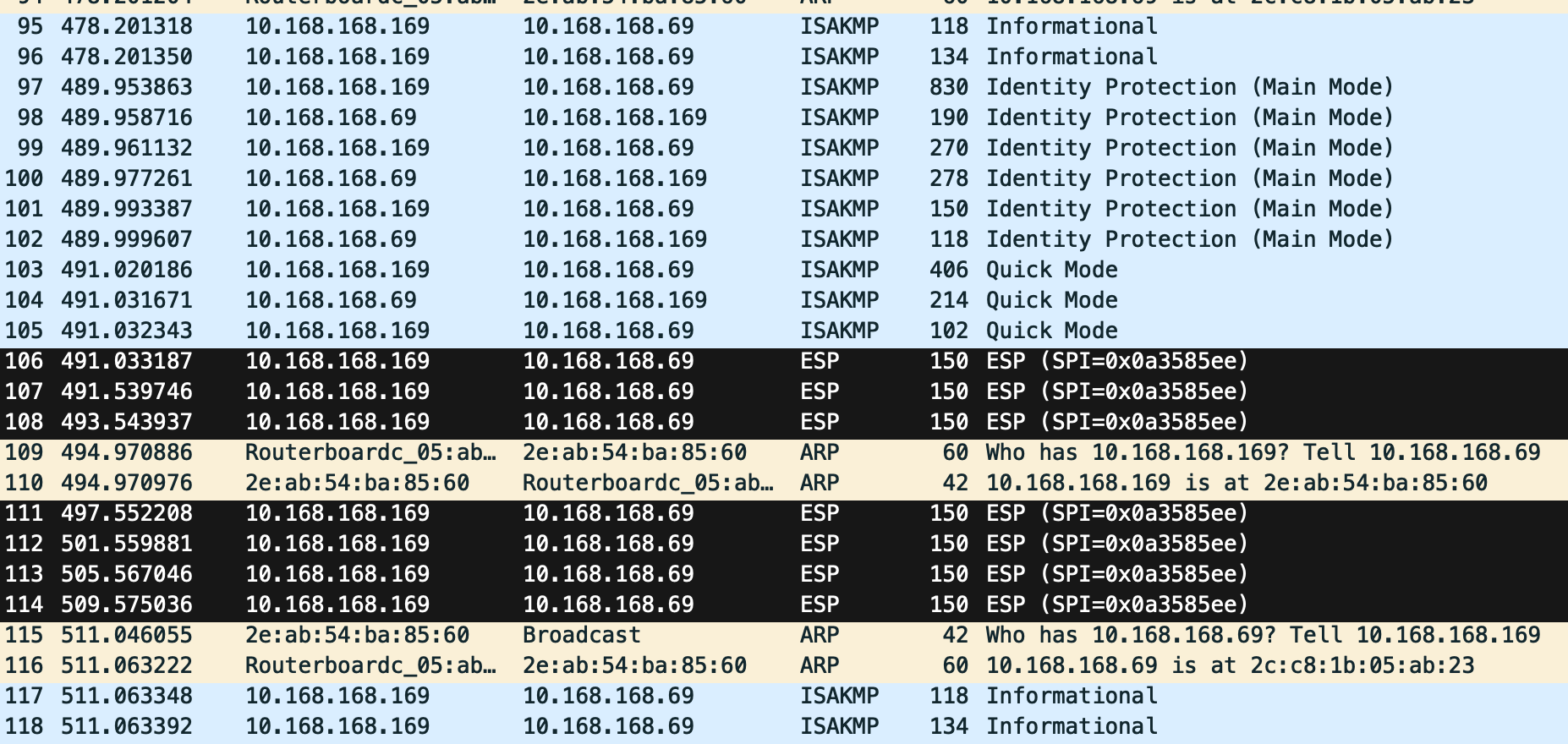
Nothing egregious jumping out at me here, but this is also the first time I troubleshoot VPN connectivity at the configuration level. Let's dig in a little more.
Tell Me All Of Your Secrets
macOS is likely going to have better logging than Mikrotik. So let’s check the log file in macOS using:
tail /var/log/ppp.log
And what I see when I try to connect is:
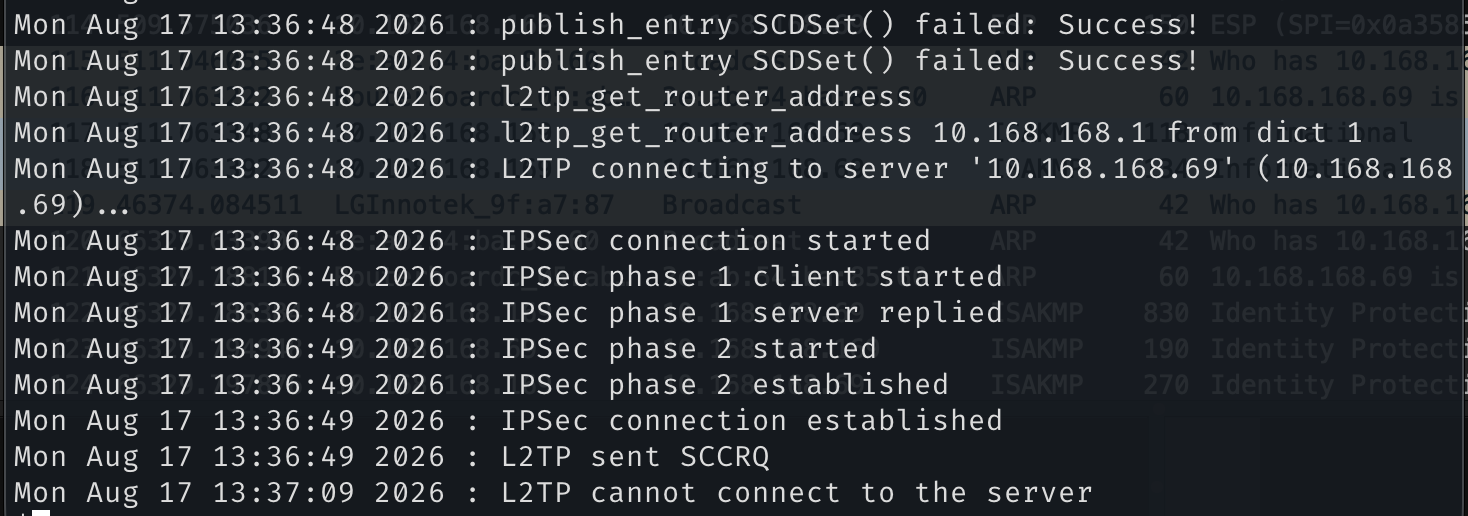
Not verbose in nature, but it's enough to get a start. Seems like there's still something misconfigured on the Mikrotik router.
SCCRQ is the Start-Control-Connection-Request outlined in RFC2661. This is the initialization message for the tunnel, and is being sent by my MacBook. It’s not getting a reply. Fine. Let’s go investigating.
There was a lot of hmac(SHA1) in the logs of the Mikrotik. That’s a problem. I’m going to reset the config of the Mikrotik at this point, as I’ve made a lot of changes and not a lot of versioning. And we’ll start over.
Take 2
First up, enable logging for l2tp and ipsec on the Mikrotik:
/system logging
add topics=ipsec,!packet
add topics=l2tp
/log print follow
Then, Quick Set to enable VPN. This is what we get:
15:30:00 system,info,account user admin logged in from 192.168.88.254 via telnet
15:30:12 system,info user admin password changed by admin
15:31:15 system,info log rule added by admin
15:31:17 system,info log rule added by admin
15:33:06 system,info cloud settings changed by admin
15:33:06 system,info ppp secret <vpn> added by admin
15:33:06 system,info pool dhcp changed by admin
15:33:06 system,info pool vpn added by admin
15:33:06 system,info nat rule added by admin
15:33:06 system,info filter rule added by admin
15:33:06 system,info filter rule added by admin
15:33:06 system,info filter rule added by admin
15:33:06 system,info filter rule added by admin
15:33:06 system,info filter rule added by admin
15:33:06 system,info dhcp client changed by admin
15:33:06 system,info static dns entry changed by admin
15:33:06 system,info PPTP Server settings changed by admin
15:33:06 system,info L2TP Server settings changed by admin
15:33:06 system,info SSTP Server settings changed by admin
15:33:06 system,info ppp profile <default-encryption> changed by admin
15:33:07 ipsec,debug 0.0.0.0[500] used as isakmp port (fd=18)
15:33:07 ipsec,debug 0.0.0.0[4500] used as isakmp port with NAT-T (fd=26)
15:33:07 ipsec,debug ::[500] used as isakmp port (fd=27)
15:33:07 ipsec,debug ::[4500] used as isakmp port (fd=28)
So we’re seeing a few things happen:
- 5 firewall rules have been added. These I already knew about.
- “Cloud settings changed by admin” and I’ve been kicking around in this device and I’ve yet to come across cloud settings. So we’ll investigate that.
- PPP secret “VPN”, yeah that’s normal.
- the DHCP pool
dhcpwas changed - the DHCP pool
vpnwas created. This is to ensure that the VPN devices have an address in local address space (which is default). - NAT rule added by admin.
- DHCP client changed by admin (I don’t know why, yet).
- static DNS entry changed by admin
- PPTP server settings changed by admin
- L2TP server settings changed by admin
- SSTP server settings changed by admin
- PPP profile
<default-encryption>changed by admin - 0.0.0.0[500] used as isakmp port (fd=18)
- 0.0.0.0[4500] used as isakmp port with NAT-T (fd=26)
- ::[500] used as isakmp port (fd=27)
- ::[4500] used as isakmp port (fd=28)
Ok, so that’s a number of changes. Let’s see if we can cheese this a little bit. Let’s export the current config to a file.
export file=config-vpn-quickset-enabled.rcf
Then we’ll undo the quickset which in the logs gives us:
16:51:51 system,info PPTP Server settings changed by admin
16:51:51 system,info L2TP Server settings changed by admin
16:51:51 system,info SSTP Server settings changed by admin
16:51:51 system,info dhcp client changed by admin
16:51:51 system,info pool dhcp changed by admin
16:51:51 system,info static dns entry changed by admin
16:51:51 system,info nat rule changed by admin
And that is… less things. But let’s export that one too. And then we’ll reset the whole thing and export the default config, because that’s what I was actually going for. Looks like the set and unset behavior is asymmetric which is… annoying. So let’s run down the additions/changes from default config to Quick Set VPN enabled (I only checked the checkbox, and these are the resulting changes to the config):
# VPN IP range 192.168.89.1/24
/ip pool
add name=vpn ranges=192.168.89.2-192.168.89.255

# this seems consistent with the tutorials. local address is the router gateway itself
/ppp profile
set *FFFFFFFE local-address=192.168.89.1 remote-address=vpn

# the ipsec-secret=secret is a literal, the value is "secret", this is the layer 2 tunnel secret
/interface l2tp-server server
set enabled=yes ipsec-secret=secret use-ipsec=yes

# point-to-point-tunneling server, hadn't seen this enabled for VPN in the guides, only l2tp
/interface pptp-server server
set enabled=yes

# secure socket tunneling protocol server, same as above. must be some
# built in shenanigan from Mikrotik to use their cloud infra to tunnel
# PPP via 443
/interface sstp-server server
set default-profile=default-encryption enabled=yes

# this is the dynamic DNS thing--I don't want it and don't need it
/ip cloud
set ddns-enabled=yes

# here come the firewall rules
add action=accept chain=input comment="allow IPsec NAT" dst-port=4500 \
    protocol=udp
add action=accept chain=input comment="allow IKE" dst-port=500 protocol=udp
add action=accept chain=input comment="allow l2tp" dst-port=1701 protocol=udp
add action=accept chain=input comment="allow pptp" dst-port=1723 protocol=tcp
add action=accept chain=input comment="allow sstp" dst-port=443 protocol=tcp
# this is a NAT rule targeting the traffic coming from the VPN dhcp pool
add action=masquerade chain=srcnat comment="masq. vpn traffic" src-address=\
    192.168.89.0/24

# this is the ppp secret
/ppp secret
add name=vpn password=markdvpn

# and then this is the logging I added
/system logging
add topics=ipsec,!packet
add topics=l2tp
So if this is a “functional” configuration for some VPN service, it’s going to be pretty janky. macOS was complaining about hashing algorithms and the Mikrotik was wanting to use SHA-1 which is understandably bad.
Ok, with no further modifications we got a different error:
17:36:13 ipsec,debug ===== received 731 bytes from 10.168.168.169[500] to 10.168.168.69[500]
17:36:13 ipsec no IKEv1 peer config for 10.168.168.169

# ok, let's try IKEv2--this is the first time I see this.
17:37:47 ipsec,debug ===== received 556 bytes from 10.168.168.169[500] to 10.168.168.69[500]
17:37:47 ipsec -> ike2 request, exchange: SA_INIT:0 10.168.168.169[500] 4bbcb89ebe31d536:0000000000000000
17:37:47 ipsec no IKEv2 peer config for 10.168.168.169
That’s a different error. Sometimes that’s progress. Chasing down these gremlins isn’t always easy, but I also think that maybe the autoconfigure stuff is hampering me in ways I don’t yet know. I’m going to take another run at it with a fresh config. In WinBox, I head to System -> Reset Configuration and I allow for the default config. It’s a very reasonable base to start from, where the router is forwarding packets functionally. Look for my next post. I’ll do a little more research in the interim, as I think I’m missing a few pieces of this puzzle.
./content/posts/no-lab-like-127.0.0.1.md 1:1 suggestion You averaged 1.01 complex marktoso.Kiss words per sentence 9:136 warning Use first person (such as Microsoft.FirstPerson 'I'm') sparingly. 9:136 suggestion Try to keep sentences short (< Microsoft.SentenceLength 30 words). 9:196 warning Try to avoid using Microsoft.We first-person plural like 'we'. 9:220 warning Consider removing 'fairly'. Microsoft.Adverbs 9:363 warning Use first person (such as ' I Microsoft.FirstPerson ') sparingly. 9:393 warning Use first person (such as Microsoft.FirstPerson 'I'm') sparingly. 13:4 suggestion 'Ain't No Party Like A Microsoft.Headings Network Party' should use sentence-style capitalization. 15:1 warning Use first person (such as Microsoft.FirstPerson 'I'm') sparingly. 15:62 warning Use first person (such as ' I Microsoft.FirstPerson ') sparingly. 15:176 suggestion 'CNT' has no definition. Microsoft.Acronyms 15:208 warning Consider using 'some' instead Microsoft.Wordiness of 'Some of the'. 15:224 warning Use first person (such as ' I Microsoft.FirstPerson ') sparingly. 15:304 warning Use first person (such as ' I Microsoft.FirstPerson ') sparingly. 15:328 warning Use first person (such as Microsoft.FirstPerson 'my') sparingly. 15:348 warning Use first person (such as ' I Microsoft.FirstPerson ') sparingly. 17:41 suggestion Try to keep sentences short (< Microsoft.SentenceLength 30 words). 17:90 error More than 3 commas! marktoso.TresComas 17:102 warning Consider removing 'really'. Microsoft.Adverbs 17:148 warning Use first person (such as ' I Microsoft.FirstPerson ') sparingly. 17:173 warning Use first person (such as Microsoft.FirstPerson 'me') sparingly. 17:310 warning Use first person (such as Microsoft.FirstPerson 'I'm') sparingly. 17:327 warning Use first person (such as ' I Microsoft.FirstPerson ') sparingly. 17:335 warning Consider removing 'foolishly'. Microsoft.Adverbs 17:405 suggestion Try to keep sentences short (< Microsoft.SentenceLength 30 words). 17:405 error Use 'we're' instead of 'We Microsoft.Contractions are'. 17:405 warning Try to avoid using Microsoft.We first-person plural like 'We'. 17:579 warning Consider removing 'really'. Microsoft.Adverbs 19:4 suggestion 'Starting From The Bottom' Microsoft.Headings should use sentence-style capitalization. 21:169 warning Use first person (such as Microsoft.FirstPerson 'I'm') sparingly. 21:200 warning Use first person (such as Microsoft.FirstPerson 'my') sparingly. 21:203 suggestion 'ISP' has no definition. Microsoft.Acronyms 21:307 suggestion 'DNS' has no definition. Microsoft.Acronyms 21:315 suggestion 'DHCP' has no definition. Microsoft.Acronyms 21:384 warning Use first person (such as ' I Microsoft.FirstPerson ') sparingly. 21:530 warning Consider removing 'easily'. Microsoft.Adverbs 23:1 warning Use first person (such as Microsoft.FirstPerson 'I'm') sparingly. 23:69 warning Use first person (such as Microsoft.FirstPerson 'I'm') sparingly. 23:142 warning Use first person (such as Microsoft.FirstPerson 'my') sparingly. 23:151 suggestion 'is buttered' looks like Microsoft.Passive passive voice. 23:177 suggestion 'IAM' has no definition. Microsoft.Acronyms 25:28 warning Use first person (such as ' I Microsoft.FirstPerson ') sparingly. 25:61 warning Use first person (such as Microsoft.FirstPerson 'I'm') sparingly. 27:4 suggestion 'And What Army' should use Microsoft.Headings sentence-style capitalization. 29:1 warning Use first person (such as 'I Microsoft.FirstPerson ') sparingly. 29:25 warning Use first person (such as Microsoft.FirstPerson 'I'm') sparingly. 29:101 warning Use first person (such as ' I Microsoft.FirstPerson ') sparingly. 29:160 warning Use first person (such as Microsoft.FirstPerson 'I'm') sparingly. 29:257 warning Use first person (such as Microsoft.FirstPerson 'my') sparingly. 31:73 suggestion 'SFP' has no definition. Microsoft.Acronyms 31:169 warning Try to avoid using Microsoft.We first-person plural like 'We'. 31:368 warning Use first person (such as Microsoft.FirstPerson 'my') sparingly. 33:97 warning Use first person (such as Microsoft.FirstPerson 'me') sparingly. 33:225 warning Use first person (such as ' I Microsoft.FirstPerson ') sparingly. 33:273 warning Use first person (such as Microsoft.FirstPerson 'I'm') sparingly. 33:438 warning Use first person (such as ' I Microsoft.FirstPerson ') sparingly. 33:512 warning Use first person (such as ' I Microsoft.FirstPerson ') sparingly. 33:553 warning Use first person (such as ' I Microsoft.FirstPerson ') sparingly. 33:579 suggestion Verify your use of 'ensure' Microsoft.Vocab with the A-Z word list. 33:643 warning Use first person (such as ' I Microsoft.FirstPerson ') sparingly. 33:679 warning Use first person (such as Microsoft.FirstPerson 'me') sparingly. 35:4 suggestion 'The Map Is Not The Territory' Microsoft.Headings should use sentence-style capitalization. 35:12 error Use 'isn't' instead of 'Is Microsoft.Contractions Not'. 37:94 warning Use first person (such as ' I Microsoft.FirstPerson ') sparingly. 37:158 error Punctuation should be inside Microsoft.Quotes the quotes. 37:235 warning Use first person (such as Microsoft.FirstPerson 'I'm') sparingly. 37:251 warning In most cases, use 'from' or Microsoft.Ranges 'through' to describe a range of numbers. 37:251 error Use an en dash in a range of Microsoft.RangeFormat numbers. 37:319 warning Use first person (such as ' I Microsoft.FirstPerson ') sparingly. 37:350 suggestion 'SFP' has no definition. Microsoft.Acronyms 39:113 warning Use first person (such as ' I Microsoft.FirstPerson ') sparingly. 39:179 warning Use first person (such as ' I Microsoft.FirstPerson ') sparingly. 41:4 suggestion 'First Thing's First' Microsoft.Headings should use sentence-style capitalization. 43:80 warning Use first person (such as Microsoft.FirstPerson 'my') sparingly. 43:83 suggestion 'WAN' has no definition. Microsoft.Acronyms 43:161 warning Use first person (such as Microsoft.FirstPerson 'my') sparingly. 43:207 warning Use first person (such as Microsoft.FirstPerson 'my') sparingly. 43:285 warning Use first person (such as Microsoft.FirstPerson 'my') sparingly. 43:350 suggestion 'DNS' has no definition. Microsoft.Acronyms 43:355 warning Consider removing 'Really'. Microsoft.Adverbs 43:375 warning Use first person (such as ' I Microsoft.FirstPerson ') sparingly. 43:456 warning Use first person (such as Microsoft.FirstPerson 'I'm') sparingly. 43:535 warning Try to avoid using Microsoft.We first-person plural like 'we'. 43:589 warning Use first person (such as ' I Microsoft.FirstPerson ') sparingly. 43:592 warning Consider removing 'really'. Microsoft.Adverbs 43:692 warning Use first person (such as ' I Microsoft.FirstPerson ') sparingly. 45:5 suggestion 'I Find Your Lack Of Access Microsoft.Headings Disturbing' should use sentence-style capitalization. 45:5 warning Use first person (such as 'I Microsoft.FirstPerson ') sparingly. 47:1 suggestion Try to keep sentences short (< Microsoft.SentenceLength 30 words). 47:4 error More than 3 commas! marktoso.TresComas 47:56 warning Consider removing 'strictly'. Microsoft.Adverbs 47:129 warning Use first person (such as ' I Microsoft.FirstPerson ') sparingly. 47:207 suggestion 'VPN' has no definition. Microsoft.Acronyms 47:353 warning Use first person (such as Microsoft.FirstPerson 'I'm') sparingly. 47:386 warning Use first person (such as Microsoft.FirstPerson 'my') sparingly. 47:408 suggestion Consider using 'more' Microsoft.ComplexWords or 'extra' instead of 'additional'. 49:1 error Use 'isn't' instead of 'is Microsoft.Contractions not'. 49:13 suggestion 'VPN' has no definition. Microsoft.Acronyms 49:28 warning In general, don't use an Microsoft.Ellipses ellipsis. 49:43 warning Use first person (such as ' I Microsoft.FirstPerson ') sparingly. 49:70 warning Use first person (such as Microsoft.FirstPerson 'I'm') sparingly. 49:108 warning Use first person (such as Microsoft.FirstPerson 'my') sparingly. 49:206 suggestion 'VPN' has no definition. Microsoft.Acronyms 49:275 suggestion 'VPN' has no definition. Microsoft.Acronyms 49:321 warning Use first person (such as ' I Microsoft.FirstPerson ') sparingly. 49:350 warning Use first person (such as Microsoft.FirstPerson 'my') sparingly. 49:414 warning Use first person (such as Microsoft.FirstPerson 'me') sparingly. 51:5 suggestion 'Casting Wall of Fire' Microsoft.Headings should use sentence-style capitalization. 53:118 error Use 'that's' instead of 'that Microsoft.Contractions is'. 53:173 suggestion 'VPN' has no definition. Microsoft.Acronyms 53:199 suggestion 'VPN' has no definition. Microsoft.Acronyms 53:373 suggestion 'VPN' has no definition. Microsoft.Acronyms 53:381 warning Use first person (such as ' I Microsoft.FirstPerson ') sparingly. 53:412 warning Use first person (such as Microsoft.FirstPerson 'I'm') sparingly. 55:43 suggestion 'VPN' has no definition. Microsoft.Acronyms 64:2 warning Use first person (such as 'I Microsoft.FirstPerson ') sparingly. 66:40 suggestion Verify your use of 'allow' Microsoft.Vocab with the A-Z word list. 73:8 warning Try to avoid using Microsoft.We first-person plural like 'we'. 73:70 warning Try to avoid using Microsoft.We first-person plural like 'we'. 73:109 error Use 'that's' instead of 'that Microsoft.Contractions is'. 73:126 error 'g. B' should have one space. Microsoft.Spacing 75:5 suggestion Try to keep sentences short (< Microsoft.SentenceLength 30 words). 75:104 warning Use first person (such as Microsoft.FirstPerson 'me') sparingly. 75:144 warning Use first person (such as ' I Microsoft.FirstPerson ') sparingly. 75:160 suggestion 'VPN' has no definition. Microsoft.Acronyms 75:205 warning Try to avoid using Microsoft.We first-person plural like 'Let's'. 77:4 suggestion 'Tell Me All Of Your Secrets' Microsoft.Headings should use sentence-style capitalization. 77:9 warning Use first person (such as Microsoft.FirstPerson 'Me') sparingly. 77:12 warning Consider using 'all' instead Microsoft.Wordiness of 'All Of'. 79:64 warning Try to avoid using Microsoft.We first-person plural like 'let's'. 85:9 warning Use first person (such as ' I Microsoft.FirstPerson ') sparingly. 85:20 warning Use first person (such as ' I Microsoft.FirstPerson ') sparingly. 89:189 suggestion 'being sent' looks like Microsoft.Passive passive voice. 89:203 warning Use first person (such as Microsoft.FirstPerson 'my') sparingly. 89:247 warning Try to avoid using Microsoft.We first-person plural like 'Let's'. 91:78 warning Use first person (such as Microsoft.FirstPerson 'I'm') sparingly. 91:202 warning Try to avoid using Microsoft.We first-person plural like 'we'. 104:29 suggestion 'VPN' has no definition. Microsoft.Acronyms 104:47 warning Try to avoid using Microsoft.We first-person plural like 'we'. 133:4 warning Try to avoid using Microsoft.We first-person plural like 'we'. 135:25 suggestion 'been added' looks like Microsoft.Passive passive voice. 135:42 warning Use first person (such as ' I Microsoft.FirstPerson ') sparingly. 136:128 warning Try to avoid using Microsoft.We first-person plural like 'we'. 137:3 suggestion 'PPP' has no definition. Microsoft.Acronyms 137:14 error Punctuation should be inside Microsoft.Quotes the quotes. 137:15 suggestion 'VPN' has no definition. Microsoft.Acronyms 137:33 suggestion Don't use language (such as Microsoft.Accessibility 'normal') that defines people by their disability. 138:7 suggestion 'DHCP' has no definition. Microsoft.Acronyms 138:24 suggestion 'was changed' looks like Microsoft.Passive passive voice. 139:7 suggestion 'DHCP' has no definition. Microsoft.Acronyms 139:23 suggestion 'was created' looks like Microsoft.Passive passive voice. 139:47 suggestion Verify your use of 'ensure' Microsoft.Vocab with the A-Z word list. 139:63 suggestion 'VPN' has no definition. Microsoft.Acronyms 139:83 suggestion Consider using 'discuss' Microsoft.ComplexWords instead of 'address'. 139:100 suggestion Consider using 'discuss' Microsoft.ComplexWords instead of 'address'. 140:3 suggestion 'NAT' has no definition. Microsoft.Acronyms 141:3 suggestion 'DHCP' has no definition. Microsoft.Acronyms 142:10 suggestion 'DNS' has no definition. Microsoft.Acronyms 143:3 suggestion 'PPTP' has no definition. Microsoft.Acronyms 145:3 suggestion 'SSTP' has no definition. Microsoft.Acronyms 146:3 suggestion 'PPP' has no definition. Microsoft.Acronyms 148:42 suggestion 'NAT' has no definition. Microsoft.Acronyms 152:36 warning Try to avoid using Microsoft.We first-person plural like 'Let's'. 152:49 warning Try to avoid using Microsoft.We first-person plural like 'we'. 152:82 warning Try to avoid using Microsoft.We first-person plural like 'Let's'. 158:6 warning Try to avoid using Microsoft.We first-person plural like 'we'. 158:54 warning Try to avoid using Microsoft.We first-person plural like 'us'. 170:5 error Use 'that's' instead of 'that Microsoft.Contractions is'. 170:12 warning In general, don't use an Microsoft.Ellipses ellipsis. 170:33 warning Try to avoid using Microsoft.We first-person plural like 'let's'. 170:69 warning Try to avoid using Microsoft.We first-person plural like 'we'. 170:147 warning Use first person (such as ' I Microsoft.FirstPerson ') sparingly. 170:234 warning In general, don't use an Microsoft.Ellipses ellipsis. 170:251 warning Try to avoid using Microsoft.We first-person plural like 'let's'. 170:321 suggestion 'VPN' has no definition. Microsoft.Acronyms 220:53 suggestion 'VPN' has no definition. Microsoft.Acronyms 220:180 suggestion 'SHA' has no definition. Microsoft.Acronyms 222:35 warning Try to avoid using Microsoft.We first-person plural like 'we'. 234:104 warning Use first person (such as ' I Microsoft.FirstPerson ') sparingly. 234:166 warning Use first person (such as Microsoft.FirstPerson 'me') sparingly. 234:176 warning Use first person (such as ' I Microsoft.FirstPerson ') sparingly. 234:195 warning Use first person (such as Microsoft.FirstPerson 'I'm') sparingly. 234:308 warning Use first person (such as ' I Microsoft.FirstPerson ') sparingly. 234:311 suggestion Verify your use of 'allow' Microsoft.Vocab with the A-Z word list. 234:348 warning Consider removing 'very'. Microsoft.Adverbs 234:446 warning Use first person (such as Microsoft.FirstPerson 'my') sparingly. 234:509 warning Use first person (such as ' I Microsoft.FirstPerson ') sparingly. 234:518 warning Use first person (such as Microsoft.FirstPerson 'I'm') sparingly. 236:40 suggestion 'was checked' looks like Microsoft.Passive passive voice. 236:146 suggestion 'was checked' looks like Microsoft.Passive passive voice. 236:184 suggestion Verify your use of 'as well Microsoft.Vocab as' with the A-Z word list. 236:210 warning Use first person (such as ' I Microsoft.FirstPerson ') sparingly. 236:284 suggestion 'was put' looks like passive Microsoft.Passive voice.✖ 12 errors, 116 warnings and 65 suggestions in 1 file.